# Send Email

This is a pre-built action in Avo Assure and comes under **@Email Element.** The functionality of this action in Avo Assure is to send an email to the receiver.

### Syntax&#x20;

**Input Value:** `N/A or (optional-Ignore Subject)>`

| Argument                                  | Description                                                                 |
| ----------------------------------------- | --------------------------------------------------------------------------- |
| N/A                                       | No input is required to send the email if the subject is already specified. |
| <p>\<Ignore Subject></p><p>(Optional)</p> | Optional input to bypass the Outlook warning for missing email subject.     |

{% hint style="warning" %}
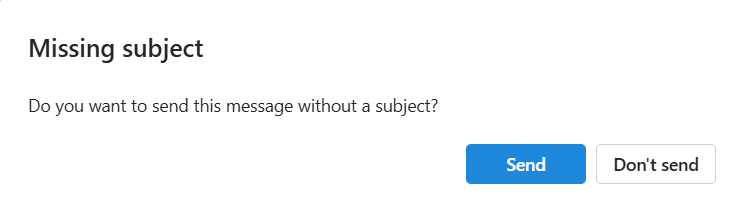
**Note:** If you attempt to send an email without specifying a subject, a pop-up will appear asking if you still want to send the email without a subject. To bypass this prompt, you can provide the input "**ignore subject**.
{% endhint %}

**Output Value:**

<table><thead><tr><th valign="top">Argument </th><th valign="top">Description </th></tr></thead><tbody><tr><td valign="top">&#x3C;Dynamic Variable>(Optional);&#x3C;Dynamic Variable>(Optional)</td><td valign="top">This dynamic variable holds the status of the action as <strong>True</strong> or <strong>False</strong>.</td></tr></tbody></table>

**Example 1**

**Sends the composed email in the Outlook application using optional parameter**&#x20;

The **Send Email** action takes the value from the Input Value column (e.g., **Ignore Subject**) and performs the send operation for the drafted email in Outlook. If no subject is provided, a confirmation pop-up appears. To bypass this pop-up and send the email without a subject, input the value **Ignore Subject**.

<figure><img src="https://2174257472-files.gitbook.io/~/files/v0/b/gitbook-x-prod.appspot.com/o/spaces%2Fk8QZzXZMIJSStKAzDSTu%2Fuploads%2FSjGW1TK87j0Z6nsbesld%2Fimage.png?alt=media&#x26;token=a686f7a4-cd49-4104-85f4-62500d13a2cd" alt="" width="557"><figcaption></figcaption></figure>

<figure><img src="https://2174257472-files.gitbook.io/~/files/v0/b/gitbook-x-prod.appspot.com/o/spaces%2Fk8QZzXZMIJSStKAzDSTu%2Fuploads%2FX4Sx3MjFGx7tPJGMgKyD%2Fimage.png?alt=media&#x26;token=ff6442bc-0b7b-48bf-b058-44c6cdef3478" alt=""><figcaption></figcaption></figure>

**Example 2**

**Sends the composed email in the Outlook application**

The **Send Email** action sends the composed email in Outlook. If the subject is already specified in the email then, no input value is required.

<figure><img src="https://2174257472-files.gitbook.io/~/files/v0/b/gitbook-x-prod.appspot.com/o/spaces%2Fk8QZzXZMIJSStKAzDSTu%2Fuploads%2F3AxF4jaxGuwfeK9GS6bu%2Fimage.png?alt=media&#x26;token=7401fed1-5f9d-4c89-82e4-426369499e66" alt=""><figcaption></figcaption></figure>

