# Add Test Step Group from Reusable Library

Below is the stepwise process to create Test steps group from Reusable Library:&#x20;

1. Click **Create Test Step Group** button and select **Add new test step Group.**
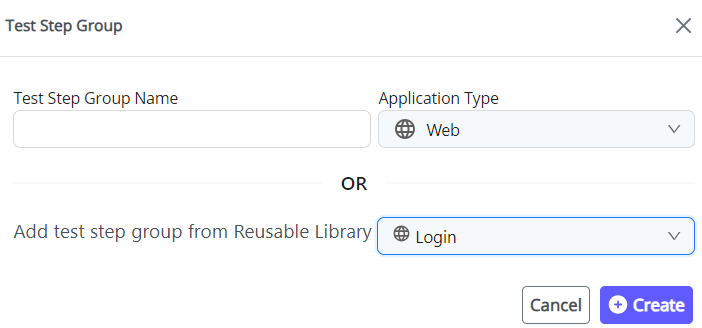
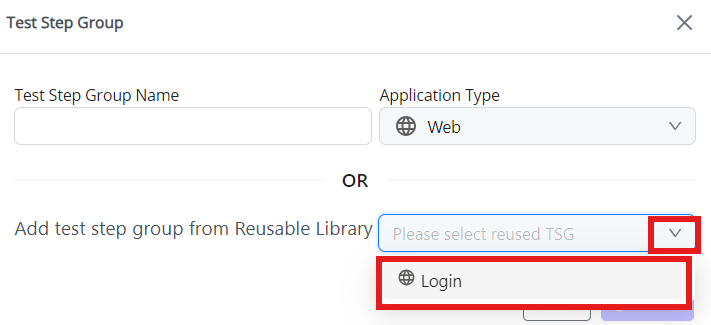
2. In the Test Step Group pop-up. Click on **drop-down icon** from **Add test step group from Reusable Library.**&#x20;
3. **Select "Login"**

<figure><img src="https://2174257472-files.gitbook.io/~/files/v0/b/gitbook-x-prod.appspot.com/o/spaces%2Fk8QZzXZMIJSStKAzDSTu%2Fuploads%2Fu734zt4AvTNOxJzU0iSC%2Fimage.png?alt=media&#x26;token=45c113e1-2bbd-420b-9615-b0d11591ecd2" alt="" width="533"><figcaption></figcaption></figure>

4. Choose **Application Type**. Click **Create.**

<figure><img src="https://2174257472-files.gitbook.io/~/files/v0/b/gitbook-x-prod.appspot.com/o/spaces%2Fk8QZzXZMIJSStKAzDSTu%2Fuploads%2F9ehEyJ4uKL8hTkjM6VLT%2Fimage.png?alt=media&#x26;token=fa12a68e-b684-44bb-97ec-d4e4248da3dd" alt="" width="527"><figcaption></figcaption></figure>

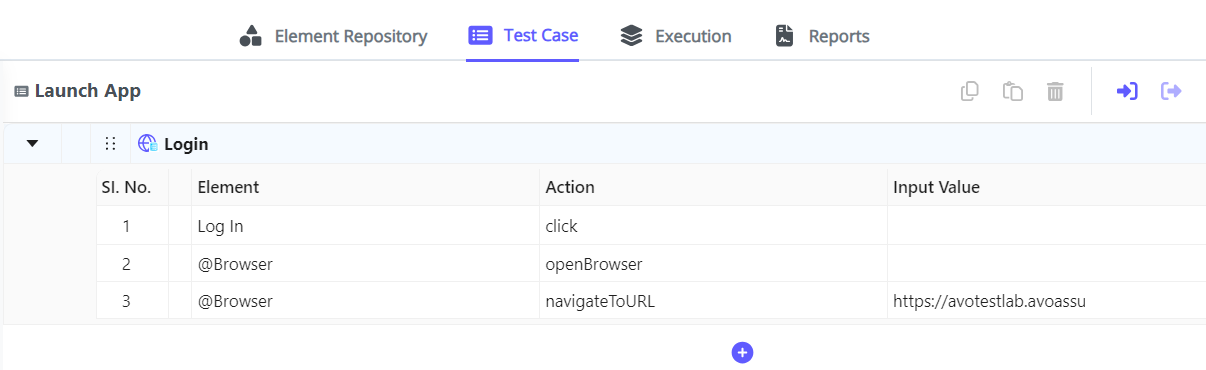
5. Test Step group will be created with Reusable library.
<figure><img src="https://2174257472-files.gitbook.io/~/files/v0/b/gitbook-x-prod.appspot.com/o/spaces%2Fk8QZzXZMIJSStKAzDSTu%2Fuploads%2FSW2qVrwZoHSbtiHWzm33%2Fimage.png?alt=media&#x26;token=a41ea8c8-c7d7-4ac1-be27-19298a95ac71" alt=""><figcaption></figcaption></figure>