# Project creation in vertical

### Step by step process to create project in vertical:

1\.  Expand the vertical section and choose the option that is Project Management.

<figure><img src="https://2174257472-files.gitbook.io/~/files/v0/b/gitbook-x-prod.appspot.com/o/spaces%2Fk8QZzXZMIJSStKAzDSTu%2Fuploads%2FtC1CqnFj2yNJSGDXZVzD%2Fimage.png?alt=media&#x26;token=47a321a0-d13c-4f92-84f7-21a1ffd3b0b9" alt=""><figcaption></figcaption></figure>

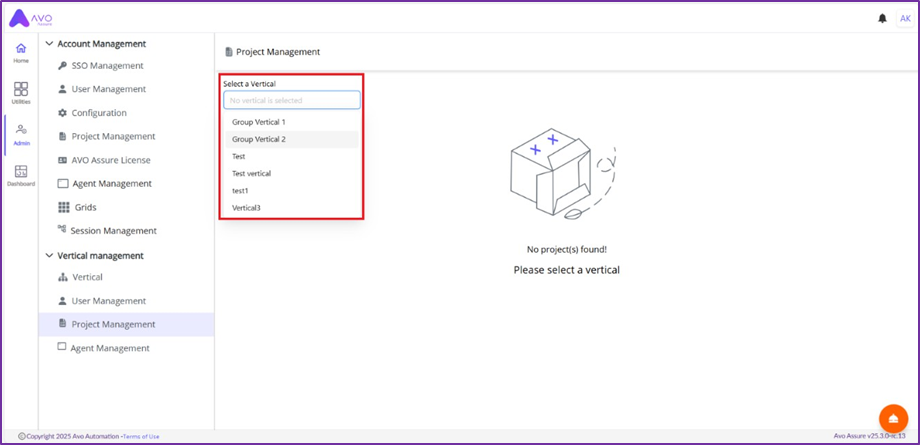
2\.  In Project Management window, select vertical

<figure><img src="https://2174257472-files.gitbook.io/~/files/v0/b/gitbook-x-prod.appspot.com/o/spaces%2Fk8QZzXZMIJSStKAzDSTu%2Fuploads%2F6ymQP3MLbKt3C1wUbXqb%2Fimage.png?alt=media&#x26;token=b14f0d49-60da-4a18-8b44-601eacf019fd" alt=""><figcaption></figcaption></figure>

3\.  Click Create Project button

<figure><img src="https://2174257472-files.gitbook.io/~/files/v0/b/gitbook-x-prod.appspot.com/o/spaces%2Fk8QZzXZMIJSStKAzDSTu%2Fuploads%2Fp62ElKCZZEItSxJd2fnE%2Fimage.png?alt=media&#x26;token=1b55d1eb-31d5-4eb2-8ac1-9a1a11425351" alt=""><figcaption></figcaption></figure>

4. Enter Project Name and Description on Create Project pop up window

<figure><img src="https://2174257472-files.gitbook.io/~/files/v0/b/gitbook-x-prod.appspot.com/o/spaces%2Fk8QZzXZMIJSStKAzDSTu%2Fuploads%2F0WR1tXFdI8jQPx4rTWPi%2Fimage.png?alt=media&#x26;token=4166822b-7135-47ac-9e17-6417dc507e21" alt=""><figcaption></figcaption></figure>

5. Click Create button and a project will be created

<figure><img src="https://2174257472-files.gitbook.io/~/files/v0/b/gitbook-x-prod.appspot.com/o/spaces%2Fk8QZzXZMIJSStKAzDSTu%2Fuploads%2Fplo6gGfIya55bsw6sPZW%2Fimage.png?alt=media&#x26;token=7d8eed74-a2ec-4848-9481-b6e449f2bd56" alt=""><figcaption></figcaption></figure>

{% hint style="info" %}
**Note:** Once the project is created it will not be visible in project list until the mapping with security groups is performed
{% endhint %}